The Scenic Route
Private beta · Android

Your sat-nav wants you off the good road. This one goes looking for it.

The Scenic Route is navigation for people who drive for the love of it. Tell it how long you've got and it plans a loop on the best roads near you, keeps your convoy together and talking, and works where the signal doesn't.

Free during the beta · Android 15 or newer · England, Scotland and Wales

1 The problem: the dual carriageway, every time

Tell it how long you've got. It finds the drive.

Every other sat-nav is built to save you minutes, so it drags you onto the dual carriageway. Finding a better road means an evening with a paper map. With this one, pick a time from 15 minutes to 12 hours and you get three loops from where you're standing, out on the best roads around and home by different ones.

  • Experiential routing finds the great stretches near your journey and builds the trip around them. Towns are still crossed the quickest way.
  • It sticks to your road. It won't swap it for a quicker one to save five minutes.
  • Preview the whole drive on the map first, with the real directions, limits and warnings.
How the routing works
Preview playing back a Roundtrip the app planned by itself, with the timeline along the bottom.
2 The problem: the group splits at the first set of lights

Keep the convoy together, and talking.

One set of lights and the group is in pieces. Nobody knows where the car in front went, and you can't ring them while you're driving. Convoy guides every car along the roads the leader actually drives. A button on the wheel that costs about £2 turns the group into a private radio.

  • Convoy: directions along the leader's real roads, and a heads-up when someone drops back.
  • Meet-up: everyone heading to the same place, with live positions and arrival times.
  • Push to talk on a Bluetooth button: no range limit, and private to your group.
  • One-press reports: a pothole or a hazard lands on every car's map, where you saw it.
See everything in Social
3 The problem: the best roads have no signal

Knows the road ahead, signal or not.

The good roads run through the hills, and that's where the bars drop out. Maps, routing and search for the whole of Great Britain live on the phone. Every warning works with or without signal.

  • Speed limits shown where the road changes, with your speed beside them. If the limit isn't known, it shows nothing rather than guess.
  • Cameras, fixed and average-speed, with your running average through a zone.
  • Collision blackspots from official records, and Highway Code warning signs ahead.
  • No Google services needed: it runs on de-Googled phones too.

See the junction before you reach it. The directions draw the real layout of the junction ahead, taken from the map, with the time to reach it at your current speed. It comes from the information phase of IPSGA, the system of car control taught on advanced driving courses: take in what's ahead early, and there's time to plan your position, speed and gear.

More on the road ahead
Setting off the opposite way round a Roundtrip: the route turns round to follow you, and the 20 limit by the school turns the speed amber.
4 The problem: lending a car raises questions

Share a car and keep the record straight.

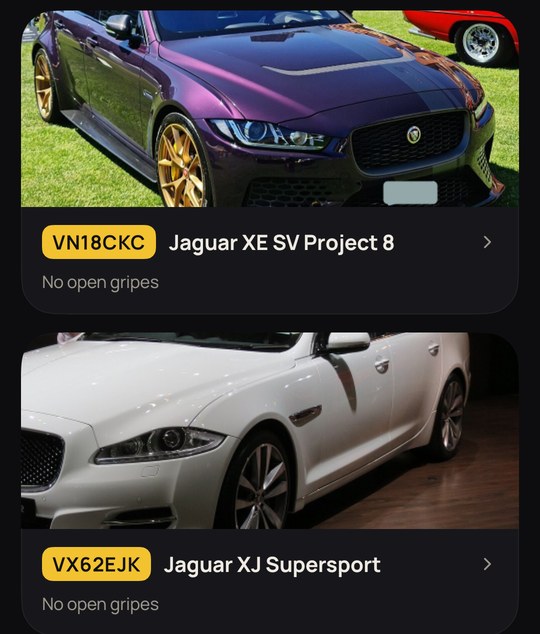
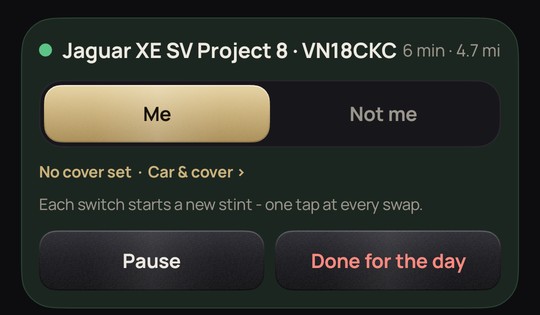
Lend a car or borrow one and there's a lot to keep track of: whether the driver's covered, what fuel it takes, and who was at the wheel when the camera flashed. The Garage briefs whoever drives your car. The logbook records who drove, when and how far, so you have the answer when a letter arrives weeks later.

  • Who was driving: sign-in and sign-out times and places, exported as a PDF with the map.
  • Never drive past your cover: a warning before your insurance ends.
  • The right fuel: the fuel type and filler side appear as you roll onto the forecourt.
  • Crib sheets and gripes that every driver adds to, with photos.

Minutes and Miles The Garage

The live Miles card for a Jaguar XE SV Project 8: who is driving, since when, miles and timeTwo Jaguars in the Garage, each with its plate covered

And everything else

Route ratings that tell you somethingNo stars. A 3 × 3 grid of how much a road asked of you and how much it gave back.
Places and stopsSave the café at the top of the pass, and get offered it when a drive takes you near.
Live fuel pricesAround 8,000 forecourts, priced like a forecourt board, offered on the way.
Record, draw and edit routesDrive it, draw it or edit it, with your own limits, signs and notes.
Routes in one tapSend a route or a whole pack into a chat. They tap Install.
Encrypted chatEnd-to-end encrypted messages for friends and club groups.
Weather on the routeThe forecast where you'll be when you get there, and a roof-up alert.
Avoid what you don't likeA junction, a road or a whole area. Single-track roads are your call.
A map drawn for driversDark and calm, with hills, contours and national parks marked.
MOT and tax flagsLooked up from the registration, with reminders timed to leave room to book.
Number plates coveredAdd a car photo and the app finds the plate and covers it.
Set up your wayNorth up or heading up, what it speaks, and speed warnings by penalty band.

Who makes it

I'm Alex. The Scenic Route is my own project, built in my spare time with a lot of help from AI. The AI notice explains how.

I'm a petrolhead, a member of IAM RoadSmart, an Advanced and Masters driver, and a graduate of the High Performance Course. I love interesting cars of every kind, and I'm a glutton for Jaguars.

I built this because every sat-nav I tried wanted me off the good road as quickly as it could. This one is for the days when the drive is the reason you went out.

The beta test programme

The beta is private: it's for my friends and family, ahead of a wider release.

What I ask of testers

Use the app properly on several drives. Then tell me what you found, through the feedback page or the app, and try the tasks I send round. All of it is voluntary.

What you get

The app before anyone else, free for the length of the beta. Test Convoy, Meet-up or the radio with one other tester and you each get a push-to-talk button posted free. Some features may be paid for after the beta.

How it's installed

The app is sent to you privately and installed straight onto your phone (sideloaded), not through Google Play. The install guide walks you through it, and I'll help if you get stuck.

Questions

Who can join?
Drivers aged 18 or over who live in the UK and hold a full driving licence, with an Android phone running Android 15 or newer. The beta is private and limited to my friends and family. If you're one of them, I'll send you a private invitation.
Will it run on my phone?
It needs Android 15 or newer on a 64-bit phone, about 6 GB of free space for the offline maps and routing, and GPS. Most phones from 2021 onwards that have had their updates qualify. To check yours, open Settings › About phone and look for the Android version. The app doesn't need Google services, so it runs on de-Googled phones such as GrapheneOS. There's no iPhone version.
What is sideloading, and is it safe?
Sideloading means installing an app from a file instead of from Google Play. Android warns you when you do it, because it can't vouch for an app that didn't come through its store. The app is sent to you directly, and the install guide shows how to check the file is the genuine one before you install it.
What does it cost?
Nothing during the beta. Some features may be paid for later. If they are, you'll be told before anything changes, and nothing is ever charged without you choosing to pay.
What happens when the beta ends?
The beta app stops working on the end date. You'll be told at least 14 days before, and your own data stays on your phone: on the day, the app still lets you export your logs, routes and places. Testers are first in line for the release version.
What happens to my data?
Maps, routing and search run on your phone. There are no adverts and no trackers. Messages are end-to-end encrypted. Accounts, Convoy and Meet-up run on a server I operate myself. The privacy notice covers it in full.
Can I use it while I'm driving?
Set it up before you set off, mount the phone in a cradle and let it speak. Using a hand-held phone while driving is illegal. The push-to-talk button is designed to be pressed without looking or taking a hand off the wheel. Read driving safely with the app before your first drive.